Install with Docker
Run highsea with Docker Compose on Linux, macOS or Windows.
Written for highsea 0.1.0, and followed on Docker Engine 29.8 with Docker Compose 5.6. Any Docker with the Compose plugin works.
Before you start
Prerequisites lists what highsea needs. Here, that's Docker with the Compose plugin. On Linux, install Docker Engine. On macOS and Windows, install Docker Desktop. Check both are there:
docker compose versionPlan your folders
highsea uses two folders on the host:
- config: the database, settings, logs and backups. Keep it on fast, reliable storage.
- data: downloads and the film library, together. When both are inside one folder on one disk, highsea moves a finished download into the library with a hardlink, which is instant and takes no extra space. When they're on different disks, it has to copy.
A layout that works well:
/srv/highsea/config
/srv/data/downloads
/srv/data/media/movies
Setup suggests /data/downloads and /data/media/movies inside the container, which is this layout once /srv/data is mounted as /data.
Find your user and group
highsea runs as the user and group that own your files, given as PUID and PGID. On Linux, id shows yours:
id
# uid=1000(alex) gid=1000(alex) …
On macOS and Windows, Docker Desktop handles file ownership itself, so the defaults of 1000 are fine.
Write the compose file
Make a folder for highsea and save this as compose.yaml inside it.
Host networking lets highsea's apps find the server on your network by themselves, and lets the torrent engine take incoming connections.
services:
  highsea:
    image: ghcr.io/highsea-tv/highsea:latest
    container_name: highsea
    network_mode: host
    environment:
      PUID: "1000"
      PGID: "1000"
      TZ: Etc/UTC
    volumes:
      - ./config:/config
      - /srv/data:/data
    restart: unless-stopped
Change these to suit you:
/srv/dataor./data: the folder that holds your downloads and films.PUIDandPGID: the numbersidshowed.TZ: your time zone, such asEurope/LondonorAmerica/New_York. Schedules and the calendar use it.
The latest tag is the newest stable release. To choose when you move to a new version, use a version number instead, such as ghcr.io/highsea-tv/highsea:0.1.0. Upgrade explains both.
Start highsea
From the folder with compose.yaml:
docker compose up -dThe first start downloads the image, about 400 MB. When it's running, docker compose ps shows the container as healthy, usually within a minute.
Run setup
Open http://<your server's address>:3000 in a browser, or http://localhost:3000 on the same machine. highsea opens its setup:
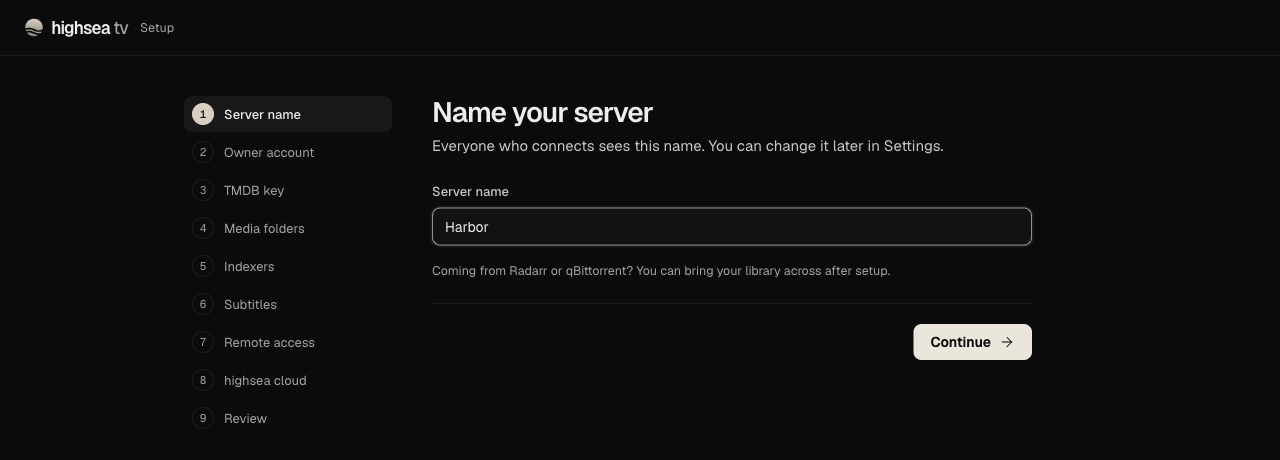
- Name your server. Everyone who connects sees this name.
- Create the owner account. A username of 2 to 32 lowercase letters, numbers, dots, dashes or underscores, and a password of at least 10 characters. You can turn on two-step verification and passkeys later, from Your account.
- Add your TMDB key. Either the API key or the Read Access Token from TMDB's API page. You can add it later in Settings.
- Choose your folders. These are folders inside the container, under
/data. highsea says "Hardlinks will work" when the two are on the same disk, and "Imports will be copied" when they aren't. - Add indexers. Pick public indexers from highsea's catalog, which need no account. If none are listed, continue, and add them later from Indexers.
- Subtitle languages. The languages to find subtitles in, in order of preference.
- Watching away from home. "Only at home" opens nothing to the internet, and is a good place to start.
- Link to highsea cloud. Optional, and off unless you turn it on. Everything in highsea works without it.
- Check and finish.
Finish setup opens the Dashboard. Add your first film from Discover. Recommended setup covers what to set up next.
Stop and start
docker compose stop     # stop highsea, keeping the container
docker compose start    # start it again
docker compose logs -f  # follow its log
restart: unless-stopped starts highsea again after a reboot, and after you restore a backup, which restarts the container on purpose.
If something goes wrong
- The page doesn't load. Check
docker compose ps. If the container keeps restarting,docker compose logssays why. - highsea can't write to a folder. The folder on the host isn't owned by
PUIDandPGID. Change the owner withsudo chown -R 1000:1000 /srv/data, using your own numbers. - Port 3000 is taken. On Linux with host networking, another program is using it. With published ports, change the left-hand side only, such as
"3080:3000", and open port 3080 instead.