Install on Synology
Run highsea as a Container Manager project on DSM 7.2 or later.
Written for highsea 0.1.0 on DSM 7.2 or later with Container Manager, and checked on DSM 7.4.1.
Container Manager runs highsea from a compose file, which it calls a project. Its containers use published ports rather than the NAS's own network, which highsea supports.
Before you start
- Install Container Manager from Package Center.
- In Control Panel › Shared Folder, make a shared folder called
dataon the volume with the most room. Inside it, in File Station, makedownloadsandmedia/movies. Keeping both in one shared folder is what lets highsea hardlink finished downloads into the library instead of copying them. - In File Station, make a folder for highsea's own files, such as
docker/highsea, and aconfigfolder inside it. Container Manager may have made thedockershared folder already. Container Manager doesn't make a missing folder for a container: withoutconfig, the project stops with "Bind mount failed" and the folder's name.
Find your user and group
highsea runs as the user and group that own your files. Turn on SSH in Control Panel › Terminal & SNMP, sign in as your DSM user, and run:
id
# uid=1026(alex) gid=100(users) …
The first user made on DSM is usually 1026, and users is 100. Make sure this user can read and write the data and docker shared folders, in Control Panel › Shared Folder › Edit › Permissions.
Create the project
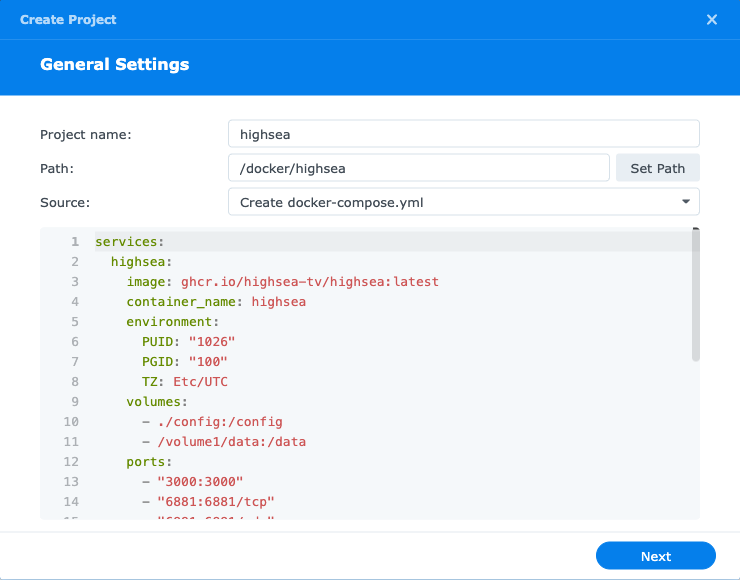
- Open Container Manager, go to Project, and choose Create.
- Fill in the first page:
- Project name:
highsea. - Path: the
docker/highseafolder you made. - Source: Create docker-compose.yml, and paste the file below.
- Project name:
- Leave the web portal through Web Station off; highsea serves its own.
- Check the summary, choose Done, and let it start the project.
services:
  highsea:
    image: ghcr.io/highsea-tv/highsea:latest
    container_name: highsea
    environment:
      PUID: "1026"
      PGID: "100"
      TZ: Etc/UTC
    volumes:
      - ./config:/config
      - /volume1/data:/data
    ports:
      - "3000:3000"
      - "6881:6881/tcp"
      - "6881:6881/udp"
      - "7368:7368/udp"
    restart: unless-stopped
Before you paste it, change:
PUIDandPGIDto the numbersidshowed./volume1/dataif yourdatashared folder is on another volume.TZto your time zone, such asEurope/Berlin.
./config is a folder inside the project's path, so highsea's database and backups sit next to its compose file.
Run setup
Open http://<your NAS's address>:3000. highsea opens its setup; Install with Docker › Run setup walks through each step.
When setup asks for your folders, use the paths inside the container: /data/media/movies and /data/downloads.
Apps on your network find highsea by its broadcast on port 7368. If one doesn't, give it the NAS's address.
Firewall
If DSM's firewall is on, allow TCP 3000, TCP and UDP 6881, and UDP 7368 from your network, in Control Panel › Security › Firewall.