Now playing
See who is watching what and how each stream is sent, stop a stream with a message, and read what was watched in the last 30 days.
Written for highsea 0.2.0-beta.2.
Now playing shows who is watching what right now, how each stream is sent, and why. It's in the sidebar after Activity, with a count while anyone is watching. Owners and Admins use it. Users never open the admin.
It has two tabs, Now and Last 30 days.
Now
The top of the tab adds up what's playing: Streams, the Mbps Sent in all, the Mbps sent Away from home, and the Transcodes running.
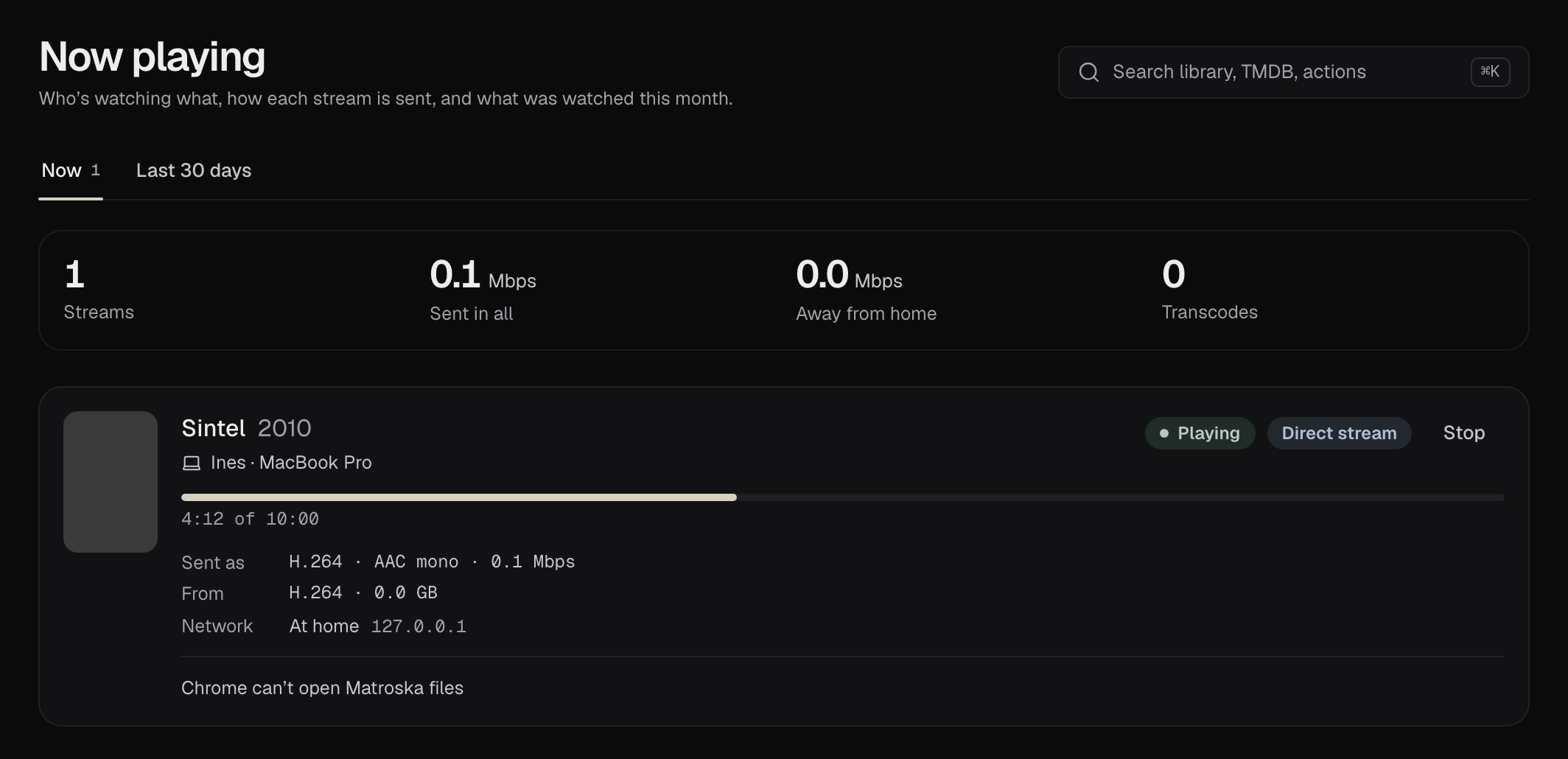
Each stream has a row with the film, the person and their device, and a badge for its state:
| State | Means |
|---|---|
| Playing | The film is playing. |
| Paused | The person paused it. |
| Waiting | A transcode is waiting for a free slot, because highsea is already making as many as Transcodes at once in Settings › Playback allows. If no slot comes free within a minute, the player says the server is busy. |
| Can't keep up | A transcode runs slower than the film, so the player keeps stopping to wait for it. |
| Stopped | Someone stopped it from this page. The row stays for a few seconds, then goes. |
Beside the state, a second badge says how it's sent:
- Direct play: the file as it is. The device plays it unchanged, which costs the server almost nothing.
- Direct stream: the picture as it is, with the sound or the container changed for the device.
- Transcode: the picture made again for the device, as it plays. This is the work that needs a capable server.
Under the progress bar, the row lists:
- Sent as: what goes to the device and its rate, such as "1080p · H.264 · AAC stereo · 9.4 Mbps".
- From: the version of the film it's made from.
- Network: At home or Away from home, with the device's address. Streams at home are never limited; away from home, they're held to the limit in Settings › Playback.
- Transcoded by, for a transcode: what does the work and how fast, against real time. "VAAPI, 6.1× real time" is the graphics chip; "The processor, 2.4× real time" keeps up easily. Below 1×, the row says Can't keep up. Hardware acceleration puts transcodes on the graphics chip.
When a stream isn't played directly, the reasons follow in plain words, such as the device not playing the file's sound format, or a subtitle that has to be drawn into the picture. If the graphics chip fails partway through a film, the row says The graphics chip failed partway, so the processor makes the rest.
Stopping a stream
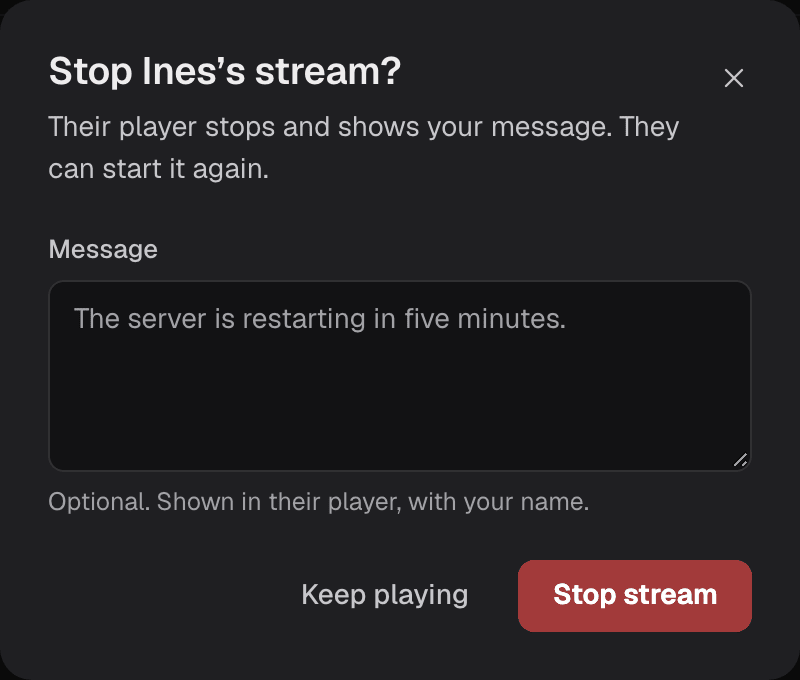
Stop ends a stream at once. You can add a message, up to 200 characters, which their player shows with your name. They can start the film again from where they were.
Last 30 days
The second tab lists every film watched in the last 30 days, newest first: the film, who watched it, on which device, how it was sent (with "away" when it was away from home), how long they watched, and when. All means they watched it to the end. Choose a person in the menu to see only theirs.
A few things keep the list honest:
- Starting a film again a moment later on the same device, to change the sound or subtitles, adds to the same row instead of making a new one.
- A film opened and closed without playing isn't listed.
- Addresses aren't kept, only whether it was at home or away.
- A daily task, Clear what was watched over 30 days ago in System › Tasks, removes older rows. When a person is removed, their rows go with them.
On the dashboard
The Now playing widget shows the same streams in brief: each film with how it's sent or Can't keep up, the person and device, and the progress, with the Mbps sent in all in its header. It comes first on the dashboard until you change it; move or remove it from Customize, as described in the dashboard's guide.
Being told when someone starts watching
A notification connection can hear Playback started, with who is watching, which film, on which device and how it's sent. It's off for every connection until you tick it: see events.